Tag: Scripting

Done via using scripting language(s).

  • Dev blog #1: Watchlist

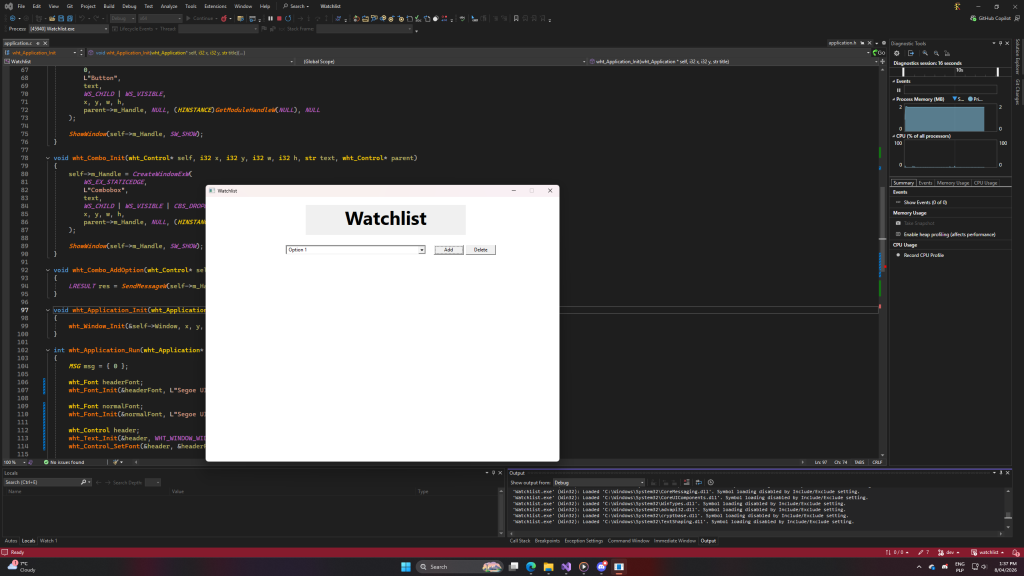
    I’m working on an app that would keep track of what episodes I watched of YouTube/TV series.

    It’s going oki. I’m just not really focused on it that much (or on the code part of things, at least).

    I also figured out a good way to do headers & documentation comments. (finally)

    /* ================================================================================
    *
    *	$Project: Watchlist
    *
    *	$Module: Logic
    *	$File: application.h
    *
    *	$Purpose: Defines the application structure and its associated functions. The
    *	application is responsible for managing the main loop and handling
    *	application-wide resources.
    *
    *	$License: MIT
    *	$Author: The Kumor
    *
    * ================================================================================ */
    /* ------------------------------------------------------------------------
    *	$Name: wht_Text_Init
    *
    *	$Purpose: Initializes a text control with the specified parameters and
    *	creates the control's window as a child of the specified parent control.
    * 
    *	$Parameters:
    *	self: Pointer to the control to be initialized.
    *	x: The x-coordinate of the control's position.
    *	y: The y-coordinate of the control's position.
    *	w: The width of the control.
    *	h: The height of the control.
    *	text: The text to be displayed in the control.
    * ------------------------------------------------------------------------ */
    void wht_Text_Init(wht_Control* self, i32 x, i32 y, i32 w, i32 h, str text, wht_Control* parent);
    /* ------------------------------------------------------------------------
    *	$Name: wht_Window
    * 
    *	$Purpose: Window structure for encapsulating properties specific to a
    *	window control, inheriting from the base control structure.
    * 
    *	$Members:
    *	Control: The base control structure for the window,
    *	containing common control properties.
    * ------------------------------------------------------------------------ */
    typedef struct
    {
    	wht_Control Control;
    } wht_Window;
    /* ------------------------------------------------------------------------
    *	$Name: wht_Control
    * 
    *	$Purpose: Control structure for encapsulating common control properties.
    * ------------------------------------------------------------------------ */
    typedef struct
    {
    	HWND m_Handle;
    	i32 m_X, m_Y;
    	str m_Text;
    } wht_Control;

    Before I make some structs opaque, I’ll leave these variables with m_ prefixes available. But they’re not considered in headers.

    I’ll create a documentation software that would parse these comments and C/C++/Lua/etc code and produce a searchable database of things. It’ll also include “sections” ($Section) blocks. But that’s a different project, and isn’t my immediate focus (perhaps late April?)

    I figured out IntelliSense at least doesn’t break with these. And as for Visual Studio Code, it even picks up $Parameters section and makes this particular line bigger.

    Visual Studio 2022’s autofill / AI is writing 50% of these comments. I also do readmes based on project reports which are partially generated by AI (I mean, 28 pages is a lot of manual labor!). But projects themselves are written fully by me, with help of the autofill for mundane tasks. I’m kind of scared people will look at these projects and be like “lol, that readme’s made by chatgpt” and assume project wasn’t done by a human. But I try not to care. People will say what they want, and in the end, I write code by myself.

    I post a cat here, because I can.

  • Updated file headers

    -- ================================================================
    --
    --	Project: Jumper
    --
    --	Module: Gamemode
    --	Component: HUD
    --	File: cl_init.lua
    --
    --	Purpose:
    --	Controls client HUD.
    --
    --	Notes:
    --	Handles font creation and scaling based on resolution, draws
    --	custom crosshair, coin count, and time remaining.
    --
    --	Author(s): The Kumor
    --
    -- ================================================================

    This is what I came up with. Project is self-explanatory, Module would come from architecture, same for component (which is a sub-module, essentially). Purpose is the most important block, Notes is additional information for it. Author(s) is my ego trip.

    A Garry’s Mod gamemode “Jumper” would have two modules: Gamemode and Entities. As of right now, there are components such as: Coin, Trampoline, Pickup, Resource, HUD.

    I like this header. I made snippets for this 🥺💞

  • Discord server

    Logo

    This is a logo I came up with (this was like my 4th attempt at doing something that looks good enough). This server is now called “Project Cloud” and I use it for hosting finished projects along with links to them. Technically speaking, I wish that once this server goes public people would use it for their projects, but for now I’m happy with it being my private little thing. Join the server.

  • Headers

    // ==================================================
    //
    //	Project: Timetables
    //
    //	Module: Application
    //	Component: Main
    //	File: timetables.cpp
    //
    //	Purpose:
    //	Implements the main command-line interface
    //	for the Timetables application.
    //
    //	Notes:
    //	Provides an interactive command interpreter
    //	that allows users to define, modify, and
    //	manage scheduled tasks. Integrates the File
    //	and Command systems to generate timetable
    //	content and compile the resulting LaTeX 
    //	document into a PDF.
    //
    //	Author(s): The Kumor
    //
    // ==================================================

    I came up with this type of header at the beginning of each file. I no longer have “Modified” and “Created” sections because they’re pretty much a hassle (but sometimes helped me).

  • KumTube released

    I finally released the project, since I freed some of my mental bandwith after finishing Garden. It runs on UploadTool.

    UploadTool allows it to display videos and upload videos. You can give them name, description, and visibility (for now does nothing).

    There’s nothing special about it, but I needed it because I ran out of Discord Nitro so I can’t upload videos that have large size.

  • Dev blog #5: Garden

    Finally released!

    Description

    Application consists of field and side menu. In the side menu, user chooses a vegetable/fruit to plant. Each plant has an image and name associated with them. Polish and English being the supported languages. Once planted, field recalculates an area trying to find if plants around like it.

    Features

    Application contains plant database. App allows resizing, saving and loading plant fields

    Software & Hardware Requirements

    Insanely low, anyone with potato PC can run it. There’s a caveat though: it only runs under Windows due to WinAPI being the only system-level API.

    Download

    Releases
    Repository

  • Dev blog #4: Garden

    This is the work so far. I am quite satisfied with this vegetable sheet, given I don’t have drawing skills (except for maps).

    I’m hoping to finish this before March. Not going to lie, this app gives me Windows 3.1 feel due to GDI. And I kind of like it.

    While image rendering might not be the most perfect thing in the world, it’s better than nothing.

  • Dev blog #2: Garden

    I’ve decided this will be Garden’s application icon

    This is the best I can do lol.

    So, next thing I have to do is make actual button rendering, embed Lua and I guess that’s it for now? I also have to find some good resources on vegetable neighborhood. That’s crucial.

  • Dev blog #1: Garden

    I’ve been coding this for a while, but as I said, I didn’t have much free time for these things. Now it’s changed.

    This project is primarily for my mom. She wanted an easy way to manage creation of her garden. Mainly with regards to “what vegetables can be next to XYZ”. I’m thinking of using Lua for scripting in the vegetable types and their neighborhoods.

    So far I created event system and basic field concept. They’ll have images on them and will flare up with particular color (red for bad neighborhood, orange for so-so, green for ok).

    I’m not so much in a rush, but I want to finish this thing. Check it out on it’s repo.

  • The energy to create

    I pretty much finished everything I had to (that wasn’t related to my personal projects). As a result, I now have a lot of time and a lot of mental energy.

    I thought I could finally start being more productive. And finally pouring that productivity into my applications I wanted to finish. Such as Garden, Chess, or that Garry’s Mod game mode about jumping.

    I’ve set up some artificial deadlines for them.

    I’ll also start streaming soon and make the Discord server more ‘inclusive’ / generic.

    Wish me luck!

  • KumTube

    I was thinking of making some video upload utility. Reasoning: I am an admin on a Garry’s Mod server. Once I run out of nitro, I’ll have to rely on third-party video sites to show evidence, in case it’s needed.

    The name is a bit funny. I thought of UploadTool. That would run a subdomain or some subdirectory/service called KumorTube on my website. I thought of shortening the name to KumTube. I know what you’re thinking, but it’s really not THAT. I just happen to have a funny second name.

    But I’d have to go through all these procedures I have when starting a new project and it’s tiring. I’ll think about this idea later.

  • Dev blog #3: Tasked

    I changed colors a bit.

    I’m going with PHP approach though.
    Changes are saved to https://github.com/thekumor/tasked/tree/dev